Out of the box, every WordPress site sends email with PHP's mail() function. It's the reason so many WooCommerce order emails, contact form notifications and password resets end up in spam, or never arrive.
Switching to SMTP is the single most effective fix for WordPress email problems. This guide explains the difference in plain English and shows you how to switch.
What PHP mail() actually does
When WordPress sends an email with PHP mail(), it hands the message to the mail software on your web hosting server, which then tries to deliver it straight to your recipient.
That sounds fine, but receiving mail providers like Gmail and Outlook see it very differently:
- Your web server isn't an email server. It doesn't have the reputation, setup or authentication that trusted email services have.
- On shared hosting, you share it. The same server might send email for hundreds of other websites, including hacked or spammy ones. Its reputation is their reputation.
- There's usually no DKIM signature for your domain, so the receiver can't confirm the email really came from you.
- SPF often fails, because your domain's SPF record usually doesn't list your web server.
- The hidden sender address is often the server's own account, such as something at your host's domain, so it doesn't match your From address and DMARC fails.
Some hosts limit or block PHP mail() entirely, which is why emails sometimes vanish without any error.
What SMTP does differently
With SMTP, an SMTP plugin intercepts every email WordPress sends and passes it to a proper email service instead, one built for delivering email. Examples include Brevo, Mailgun, Postmark, SendGrid and Amazon SES, or your mailbox provider such as Google Workspace or Microsoft 365.
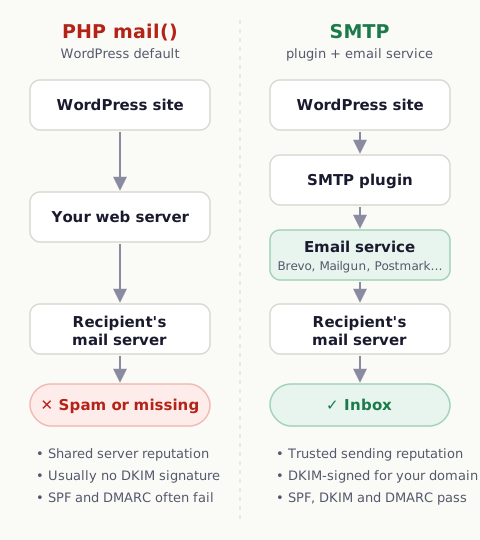
| PHP mail() | SMTP / email service | |
|---|---|---|
| Who sends | Your web hosting server | A dedicated email service |
| Reputation | Shared with every site on the server | Managed by the email service |
| DKIM signing | Usually none | Yes, once your domain is verified |
| SPF | Often fails | Passes once you include the service |
| Delivery logs | None | Yes: delivered, bounced, blocked |
| Reliability | Varies by host; sometimes blocked | Built for it |
Technically, many plugins now connect to email services through an API rather than the SMTP protocol itself, but the idea is the same, and "SMTP plugin" has become the common name for all of them.
How to tell if your site uses PHP mail()
The quickest way is to test a real email. Get a free address from WP Mail Tester and send an email to it from your site, for example from your contact form or an SMTP plugin's test screen. The Sending Environment section of the report shows whether the email went through PHP mail() or a real email service, and which SMTP plugin is installed.
If you already have WP Mail SMTP installed, check its settings. If the mailer is set to the default (PHP) option, it isn't actually sending through a service yet.
How to switch to SMTP
1. Choose an email service
For website emails such as orders, form notifications and password resets, choose a transactional email service:
- Brevo: generous free plan, easy setup. A good default for small sites.
- Mailgun: popular with developers and higher-volume sites.
- Postmark: focused on transactional email and fast delivery.
- SendGrid: widely used, with a free tier.
- Amazon SES: very cheap at volume, more technical to set up.
2. Verify your domain with the service
The service gives you DNS records to add, usually for SPF and DKIM. Add them at your domain registrar, Cloudflare or your host. This step is what makes your emails trusted, so don't skip it. If you already have an SPF record, add the service's include: to it rather than creating a second record. See SPF, DKIM and DMARC for WordPress.
3. Install an SMTP plugin
WP Mail SMTP, FluentSMTP and Post SMTP are free and widely used. Install one, choose your email service as the mailer, and paste in the API key from your service's dashboard.
4. Set the From address
Use an address on your own domain, such as hello@yourdomain.com, and turn on the option to force this From address for all emails. That way every plugin on your site sends from the verified address.
5. Test
Send a test email to a WP Mail Tester address. You're aiming for SPF, DKIM and DMARC all passing, the Sending Environment showing your email service rather than PHP mail(), and a low spam score.
Common questions
Is PHP mail() ever fine?
For a personal site that rarely sends email, it might work well enough. For anything where email matters, such as a store, a business enquiry form or a membership site, switching is worth the 20 minutes.
Does switching cost money?
Usually not. Brevo, Mailgun and SendGrid have free tiers that cover most small sites, and the SMTP plugins have free versions.
Can I use my Gmail or Google Workspace account?
You can connect Google Workspace through WP Mail SMTP's Google mailer, and it works for low volumes. Google limits how much you can send, though, so a dedicated transactional service is a better fit for stores and busy forms.
Will this fix my password reset and WooCommerce emails too?
Yes. WordPress core, WooCommerce and form plugins all send through the same WordPress mail system, so switching it fixes them all at once. See password reset emails going to spam and WooCommerce order emails going to spam.